Azizou Keynote Template: A Complete Presentation Toolkit
Imagine spending weeks perfecting your business plan, your marketing strategy, or your latest creative project, only to present it in a generic, uninspired slide deck. The content is solid, but the delivery feels flat. This is the gap that a robust presentation tool is designed to bridge. The Azizou Keynote Template isn't just a collection of slides; it's a comprehensive visual system designed to communicate professionalism, clarity, and style from the very first click. For entrepreneurs, designers, and marketers, having a reliable, adaptable presentation framework is a game-changer for everything from investor pitches to client workshops.
Beyond a Single Template: A Cohesive Design System
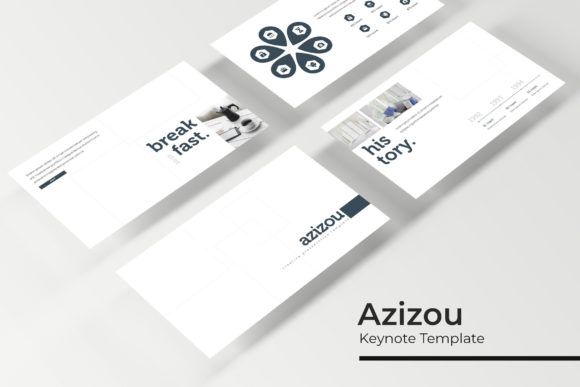
What sets this collection apart is its sheer scope and thoughtful organization. Instead of offering one monolithic file, it provides a complete ecosystem of 150+ total slides built on a foundation of versatility. This is broken down into 5 premade color schemes, with 30 meticulously crafted slides for each color template. This structure is incredibly practical. A brand consultant can select a color palette that aligns with a client's brand identity for a cohesive pitch. A startup founder can use one color scheme for their internal team meetings and another, more vibrant one for public-facing investor presentations. This approach ensures visual consistency across different contexts without starting from scratch each time.
The design philosophy centers on pixel-perfect illustrations and handcrafted infographics. These aren't generic clipart. They are custom-drawn assets that give presentations a unique, polished look. The inclusion of section break slides and dedicated gallery and portfolio slides demonstrates an understanding of real-world presentation flow. You can smoothly transition between complex data analysis and a showcase of your best work, maintaining audience engagement through varied visual storytelling. The resizable and editable graphics and picture placeholders mean you spend less time wrestling with formatting and more time refining your message. The drag & drop functionality, based on clean Master Slides, makes customization accessible even for those with minimal design experience.
Practical Applications for Modern Brands and Creators
The true value of a tool like the Azizou Keynote Template is measured by its utility across diverse projects. Its clean, modern aesthetic makes it a versatile asset for numerous applications.
For branding and identity, the consistent color variations and structured layouts are perfect for presenting brand guidelines, mood boards, and strategy documents to clients. The professional look helps build trust and reinforces the quality of your work. In marketing and sales, teams can build compelling sales decks, product launch presentations, and quarterly reports that are both data-rich and visually engaging. The infographic slides are particularly useful for simplifying complex metrics.
Content creators and bloggers will find immense value in using it for webinar slides, online course materials, or media kits. A well-designed presentation can elevate a digital product, making it feel more premium and worth the investment. For packaging and product design presentations, the portfolio slides allow you to showcase mockups in a professional setting, while the clean layouts help present production specs and timelines clearly. Even for internal uses, like team training or project kickoffs, having a polished template improves clarity and keeps meetings focused.
Maximizing Your Investment: What's in the Package?
Understanding exactly what you receive helps you leverage the template to its full potential. The package is comprehensive: 5 PPTX files in widescreen format, each corresponding to one of the 5 premade color schemes. This is the core of the system, giving you immediate variety.
Included is a Readme First file, which is crucial. This document typically contains important instructions for setup, tips for best use, and, most importantly, information on the font used. The note that a free font download link is included is a significant benefit. It removes the hassle of hunting for the right typeface and ensures the design looks exactly as intended without additional cost. Always review this file first—it's the key to a smooth setup.
A critical note for all users: the photographs or pictures used in the preview are for illustration only and are not included. This is standard practice. You will need to supply your own high-quality images. This is actually an advantage, as it forces you to integrate your own branding photography, team photos, or product shots, making the final presentation authentically yours.
Choosing and Implementing Your Presentation Style
With five color options and over 150 slides, the first step is selection. Don't default to the first color you see. Consider the context. A deep, muted palette might convey authority for a financial services pitch, while a bright, energetic scheme could be ideal for a youth-focused brand launch. Test the colors against your primary brand colors to ensure harmony.
Next, think about structure. The template is a starting point, not a rigid script. Use the section break slides to plan your narrative arc. Move the portfolio slides to the front if you're leading with your best work, or place them after a detailed analysis to provide a tangible outcome. The editable graphics allow you to simplify complex infographics or elaborate on simple ones, tailoring the information density to your audience's expertise level.
Remember, the goal is professional presentation and audience engagement. A beautifully designed slide with a single, powerful statistic can be more effective than a cluttered slide full of bullet points. Use the picture placeholders strategically to break up text and add human or product-centric visuals. The drag-and-drop nature of the Master Slides makes this experimentation fast and intuitive.
Ultimately, a resource like the Azizou Keynote Template is about saving time while elevating quality. It provides the design assets and modern typography