Winterist Keynote Template: Crafting Polished Winter Presentations
Imagine this: you have a crucial pitch for a new seasonal product line, a quarterly review that needs to feel fresh, or a workshop on winter marketing strategies. You open your presentation software, faced with the same default slides, and feel the creative energy drain away. The struggle to make slides look professional, cohesive, and visually engaging is real, especially when you're pressed for time. This is where a thoughtfully designed template system like the Winterist Keynote Template steps in, not as a magic wand, but as a serious toolkit for anyone who needs to communicate ideas with clarity and style during the colder months or for any project with a crisp, clean aesthetic.
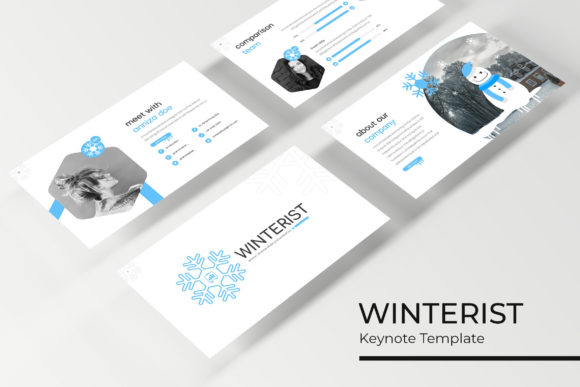
At its core, Winterist is more than just a single set of slides. It’s a comprehensive library of 150+ total slides, meticulously organized across five premade color palettes. Each of the five color variations offers 30 uniquely crafted slides, giving you a substantial foundation to build upon. This structure immediately solves one of the biggest headaches in presentation design: starting from a blank canvas. Whether you're drawn to the serene blues of a winter sky, the warm neutrals of a cozy cabin, or the vibrant contrast of holiday accents, you have a professional starting point that sets the right mood from slide one.
Beyond Slides: A System for Visual Storytelling
What truly sets a template apart is how it helps you tell your story. Winterist includes handcrafted infographic elements designed specifically for Keynote. Instead of wrestling with basic shapes and alignment, you have access to pre-built charts, timelines, process flows, and data visualizations that are already styled to match the overall aesthetic. This is invaluable for small business owners presenting sales figures, marketers showcasing campaign results, or entrepreneurs explaining a business model. The dedicated section break slides create natural pauses in your narrative, while the gallery and portfolio slides offer elegant, pre-formatted ways to display your work—perfect for designers, photographers, or agencies highlighting client projects.
The practicality extends to the editing process. Every graphic element is resizable and editable, built upon master slides for effortless global changes. Need to adjust the font size or color scheme halfway through? A single edit to the master slide propagates across your entire deck, ensuring pixel-perfect consistency. The drag-and-drop picture placeholder functionality is a game-changer for efficiency. Simply drag your product image, team photo, or infographic icon into the designated area, and it snaps perfectly into place, saving you from tedious manual cropping and resizing.
Practical Applications for Winterist and Beyond
While the name suggests a seasonal focus, the clean, modern typography and structured layouts of this Keynote template have a much broader application. Think of it as a foundation for any project that demands professionalism and visual coherence.
- Brand & Business Pitches: For entrepreneurs and startups, a polished pitch deck is non-negotiable. Winterist provides the structure to present your mission, market analysis, product features, and financials in a way that builds investor confidence.
- Marketing & Sales Materials: Create compelling sales decks, quarterly marketing reports, or social media strategy presentations that align with your brand identity. The consistent use of color and typography reinforces brand recognition.
- Educational Workshops & Webinars: If you're a coach, consultant, or educator, these slides help you design engaging training materials. The infographic sections are perfect for breaking down complex concepts into digestible visual steps.
- Internal Communications: From project updates to all-hands meeting summaries, using a professional template elevates the perceived importance and clarity of internal communications.
- Event & Invitation Design: The aesthetic is well-suited for designing digital invitations for winter galas, holiday parties, or product launch events, ensuring your first point of contact sets a sophisticated tone.
Maximizing Your Template: A Designer's Perspective
Having a powerful tool is one thing; using it effectively is another. Here’s how to get the most out of a system like Winterist, with advice that applies to any premium font or design asset you integrate into your workflow.
First, choose your color variation intentionally. Don't just pick your favorite color. Consider the psychological impact and context. A deep navy conveys trust and stability, ideal for corporate presentations. A palette with warm grays and a single accent color feels modern and approachable, great for creative agencies. Let your project's goal guide your choice.
Second, leverage the master slides for true consistency. This is where the "pixel-perfect" promise comes to life. Before you start adding content, spend a few minutes in the master slide view. Adjust the default font styles if you have a specific brand typeface, or tweak the accent colors to perfectly match your brand's hex codes. This upfront investment ensures every slide you create adheres to your brand guidelines automatically.
Third, think in systems, not just slides. The gallery and portfolio slides aren't just for images. You can adapt them to showcase testimonials, feature different product lines, or highlight key team members. The infographic elements can be combined and customized. See the template as a set of building blocks you can rearrange to suit your unique content flow.
Finally, respect the licensing and the assets. The note that photographs used in previews are not included is crucial. You need to source your own high-quality images that match the template's professional standard. Likewise, the included font download link is a courtesy—ensure you understand its licensing terms if you plan to use the template for commercial client work. Using a consistent, high-quality typeface throughout your presentation is just as important as the slide layouts themselves for maintaining a professional look.
The Winterist Keynote Template, with its 150+ slides and structured approach, ultimately serves one purpose: to free you from design drudgery. It provides a polished, adaptable framework so you can focus on what truly matters—your message, your story, and your audience. It’s a practical asset for turning winter (or any season) into an opportunity for clearer, more impactful communication.