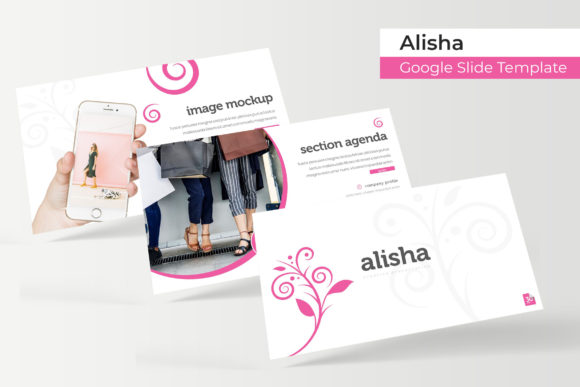
Alisha Google Slide Template: 150+ Slides for a Polished Presentation
You know the feeling. You have a brilliant idea, a crucial update for your team, or a pitch that could change your business trajectory. You open up your presentation software, and the blank slide stares back at you, a canvas of infinite possibility that somehow feels paralyzing. The time spent aligning text boxes, searching for cohesive color palettes, and trying to make basic charts look professional is time stolen from refining your actual message. This is where a thoughtfully constructed template system shifts from a luxury to a necessity, providing a robust framework so your content can take center stage.
The Alisha Google Slide Template isn't just another collection of pre-made slides. It’s a comprehensive design system built for visual storytelling. With over 150 total slides organized into five distinct, premade color schemes, it offers a level of depth and versatility that moves beyond the basics. Each color variation contains 30 meticulously crafted slides, ensuring that whether you’re presenting quarterly financials, launching a new product, or outlining a creative project, you have a coherent and visually engaging layout at your fingertips. The design philosophy centers on clean modern typography and a balanced use of space, making it suitable for everything from corporate boardrooms to creative studio reviews.
Beyond Static Slides: A Toolkit for Dynamic Visual Communication
What truly sets this resource apart is its integration of handcrafted infographics and dedicated section break slides. Instead of wrestling with generic chart tools, you can utilize beautifully designed data visualization elements that are already styled to match your chosen color theme. This ensures your statistics and processes are not just clear, but compelling. The inclusion of gallery and portfolio slides is a game-changer for creatives, architects, photographers, and consultants. You can drag and drop your work into pre-sized picture placeholders, maintaining pixel-perfect alignment and professional framing without any design guesswork.
The technical foundation is just as strong as the aesthetic one. Built on master slides, every element in the Alisha Google Slide Template is resizable and editable. This means you can confidently adjust layouts to fit your specific content needs, knowing that the underlying design integrity will remain intact. The illustrations included are vector-based, so they scale flawlessly to any size without losing quality—a critical feature for both on-screen presentations and printed handouts.
Practical Applications for Entrepreneurs and Creatives
For a small business owner, consistency is key to building brand recognition. Using this template system allows you to maintain a unified visual language across all your communications. Imagine presenting a partnership proposal that uses the same color scheme and typographic style as your client onboarding documents and your social media case studies. This level of cohesion builds trust and projects an image of meticulous professionalism.
Content creators and marketers will find immense value in the structure for planning campaigns and reporting results. The infographic slides can transform a monthly analytics report from a dry spreadsheet into an engaging narrative. Portfolio slides become essential for freelancers showcasing their work to potential clients, while the clean, modern layouts are perfect for pitching brand collaborations or outlining content calendars. Even educators and bloggers can leverage the template to design course materials, workshop visuals, or comprehensive blog post summaries that enhance reader engagement.
Maximizing the Included Assets: A Quick Guide
To get the most out of this package, a bit of strategic planning goes a long way. Start by exploring all five color variations. Each has a distinct mood—some may feel more corporate and trustworthy, while others are vibrant and energetic. Select the one that best aligns with your brand personality or the specific tone of your presentation.
Next, familiarize yourself with the slide master. This is where the core design elements live. Making global changes, like updating your logo or adjusting the primary font color, can be done here once and will automatically apply across all your slides, saving you significant time. The drag-and-drop picture placeholders are your best friend for visual projects; simply right-click the placeholder, choose "Change Image," and select your file. It will automatically crop and position to fit the design frame perfectly.
A note on fonts: the package includes a readme file with links to download the free fonts used in the design. Installing these fonts before you begin editing is crucial to preserve the intended look and feel. While the template is flexible, using the recommended typography ensures that line spacing, kerning, and overall readability remain optimized as the designers intended.
Final Thoughts on Streamlining Your Workflow
Ultimately, the value of a tool like the Alisha Google Slide Template lies in its ability to remove friction from the creative process. It provides a professional starting point that respects your time and elevates your output. By handling the heavy lifting of layout, color theory, and visual hierarchy, it frees you to focus on what matters most: crafting a clear, persuasive, and memorable message for your audience. Whether you're building a brand identity from scratch, refining your marketing materials, or simply aiming to communicate more effectively, having a reliable and versatile design system in your toolkit is an investment that pays dividends in clarity and impact.